

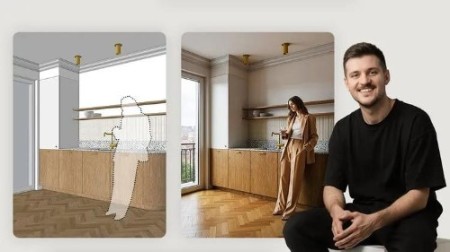
Architectural AI: Master FLUX, Nano Banana & Video Tools
Published 11/2025
Duration: 5h 46m | .MP4 1920×1080 30fps(r) | AAC, 44100Hz, 2ch | 7 GB
Create photorealistic visualizations and animations using FLUX Kontext, Nano Banana, Seedream, and AI video tools
What you’ll learn
– Generate photorealistic architectural visualizations from simple 3D models using FLUX Kontext, Nano Banana, and Seedream AI models
– Create consistent AI-generated video animations and multiple coherent views using Veo, Kling, WAN, and advanced AI video generation tools
– Master ComfyUI workflows to connect multiple AI models, automate visualization tasks, and optimize generation processes for your hardware
– Edit and enhance visualizations with AI-powered tools, add realistic figures to scenes, and upscale images to 4K resolution professionally
Requirements
– Basic understanding of 3D modeling software like SketchUp or Blender helpful but not required for completing this comprehensive AI course
– Computer with internet connection to access cloud-based AI platforms like Gemini, Playground, and Krea for visualization generation
– Willingness to learn new AI technologies and experiment with prompting techniques to achieve professional visualization results
– No prior AI experience needed-course covers everything from basic concepts to advanced workflows in architectural visualization
Description
Transform Your Design Workflow with AI Visualization Technology
Master Photorealistic AI Rendering in Minutes
Generate Consistent Views and Stable Video Content
One of the biggest challenges in generative AI is maintaining consistency between frames and animations. This course addresses this critical skill head-on. Learn how to produce repeatable results using Seedream and master popular video models including WAN, Kling, and Veo that transform static images into dynamic sequences. You’ll discover methods for creating entire series of coherent views from a single interior or building perspective, including smooth transitions between frames. Understanding how AI interprets motion-whether it’s a walking figure or changing daylight-becomes essential knowledge for bringing dynamism into your architectural projects.
Revolutionary Image Editing with Nano Banana AI
Nano Banana represents a breakthrough in AI-powered post-production for architectural visualization. Currently the best free AI model for visualization editing, it understands human anatomy and movement logic better than any competing tool. This makes it exceptionally effective for adding people to interiors and architectural scenes. Eliminate time-consuming manual work like matching light direction and creating realistic shadows on human figures in your scenes. You’ll learn to use Nano Banana across three different interfaces: the browser-based Gemini platform, advanced AI Studio, and directly within Photoshop. Simple text commands allow you to change colors, lighting, furniture arrangements, and even clothing styles. Master practical inpainting and outpainting techniques, learn to utilize graphic references, and maintain style consistency across different generations.
Navigate the AI Visualization Ecosystem
ComfyUI: Your Command Center for Multiple AI Models
Master Effective Prompting Strategies
Real-World Case Studies and Practical Applications
Theory matters, but practical experience teaches most effectively. Examine real examples of AI in architecture and design work. Learn how professionals in your field utilize new technologies to work faster and more efficiently. These examples demonstrate that AI represents a genuine working tool for designers, not merely a technological curiosity. Follow complete workflows from simple SketchUp 3D models through FLUX Kontext generation to adding figures and creating short animations in Kling or Veo. Learn to plan frames, establish perspective, match style to project requirements, and create coherent series of views that appear professionally studio-produced.
Upscaling and Quality Enhancement Techniques
While Seedream generates images up to 4K resolution, not all AI models work at such high resolutions. This course introduces Upscayl, a free open-source tool for enlarging and sharpening images without complex configuration. You’ll also explore other upscalers and enhancers capable of quadrupling image size. Discover when to apply these tools and how to extract maximum quality from every shot. Your visualizations and video frames will be sharp, detail-rich, and ready for portfolio publication or client presentations.
Ethics and Legal Considerations in AI Design
Who this course is for:
– Architects and interior designers seeking to accelerate visualization workflows and create photorealistic renders in minutes, not hours
– Design students and professionals wanting to gain competitive advantage by mastering the latest AI visualization technology and methods
– Freelance designers and studio owners looking to reduce rendering time, increase project capacity, and deliver stunning visuals faster
More Info

DDownload
https://www.keeplinks.org/p27/698249202886f
RapidGator
https://www.keeplinks.org/p27/69824ac2a6878
NitroFlare
https://www.keeplinks.org/p27/69824d54126ba