

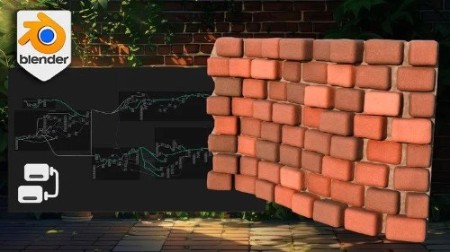
Blender Basics Geometry Node Brick Walls Workshop
Published 5/2024
Duration: 4h33m | .MP4 1280×720, 30 fps(r) | AAC, 44100 Hz, 2ch | 3.16 GB
Blender Geometry Node Course – Master realistic 3D walls with Blender’s powerful Geometry Node capabilities
What you’ll learn
• Blender Viewport Basics: Master the foundational skills needed to navigate and manipulate the Blender viewport effectively.
• Geometry Nodes Introduction: Discover how to utilize geometry nodes to create complex structures.
• Curve Line Layers: Create and use curve line layers as the base structure for your brick wall.
• Dynamic Spawn Points: Set up dynamic spawn points that adjust based on curve scale.
• Precise Alignment: Use the ‘index’ node for precise point alignment along curves.
• Brick Primitives: Create versatile brick primitives with dynamic width and height parameters.
• Brick Rotation: Align brick rotations to curves using the ‘align euler to vector’ node.
• Row Offset Techniques: Learn to offset every other row of bricks for a natural look.
Requirements
• To own a computer (Microsoft, Linux or Mac)
• To have downloaded Blender
• The course is designed for all levels, so no previous experience in Blender or 3D modelling is necessary.
Description
Introducing: ‘Blender Basics Geometry Node Brick Walls Workshop’!
Have you ever wanted to create detailed and realistic brick walls for your 3D projects? Or perhaps you’re looking to master Blender and explore the powerful capabilities of Geometry Nodes?
If so, this workshop is perfect for you!
Welcome to the
‘Blender Basics Geometry Node Brick Walls Workshop’
! I’m Luke, your guide from 3D Tudor, where we sprinkle a bit of 3D magic to enhance your virtual environments. We also whip up Blender Geometry Nodes to turbocharge your workflow, making your projects smoother than a buttered pancake.
Today, I’m thrilled to guide you through the ‘Blender Basics Geometry Node Brick Walls Workshop’, where you’ll learn to create your own geometry nodes from scratch!
Why This Workshop?
‘Blender Basics Geometry Node Brick Walls Workshop’
.
Top 6 points about ‘Blender Basics Geometry Node Brick Walls Workshop’:
Beginner-Friendly Approach:
Accessible to all experience levels with introductory videos on Blender navigation and shading.
Hands-On Geometry Node Learning:
Dynamic Parameter Techniques:
Create dynamic spawn points and precise alignments for natural, professional 3D models.
Efficiency and Workflow Optimization:
Learn to clean up and organize Geometry Nodes, enhancing readability and efficiency.
Advanced Texturing and Material Generation:
Master aged effects, gaps, weathering, and realistic PBR materials for detailed brick walls.
Practical Castle Project:
Apply skills in a miniature castle project, creating walls, towers, pathways, and decorations using Geometry Nodes.
Initial Setup
Using Mesh Lines:
Dynamic Elements
Creating Dynamic Spawn Points:
Next, we’ll move on to creating dynamic spawn points that adjust based on the scale of a curve. Using the curve length node, you’ll learn to control the spawn rate and ensure your bricks are placed accurately and dynamically.
Curve Placement and Alignment:
Positioning is key in any 3D model. We’ll utilize the ‘index’ node to align our points along the curvature, creating an offset value for a randomized yet cohesive placement of bricks. This will help you achieve a natural look for your walls.
Maintaining Uniformity
Ensuring Uniform Columns:
Efficient Workflow:
Efficiency is crucial in any workflow. We’ll dedicate a lesson to cleaning up our Geometry Nodes, setting up reroutes, and grouping nodes for better readability and usability. You’ll also learn to hide unused parameters, making your setup more compact and efficient.
Creating Bricks
Brick Formation:
Adding Character
Weathering Effects:
To add character to your walls, we’ll explore how to create aged effects. You’ll learn to set up gaps, create individual rotation offsets, and apply weathering effects using noise textures. We’ll also cover dynamic resolution changes and bevel techniques to achieve that weathered, realistic look.
Cement Fillers:
Cement fillers between bricks are essential for authenticity. We’ll create a cement layer using grid creation techniques, accurately positioning it along the curve shape. You’ll learn to offset the cement based on brick scale, ensuring it always fits perfectly.
Texturing and Shading
Texture Generation:
Texture generation is where your wall comes to life. We’ll combine noise textures with PBR materials to create realistic brick textures. You’ll also learn to randomize brick colors based on the Cycles renderer and highlight brick edges for added detail.
Practical Application
Final Project:
We’ll finish with a practical project where you can apply everything you’ve learned in the
‘Blender Basics Geometry Node Brick Walls Workshop’
. You’ll create a castle wall and tower, complete with walkable pathways and detailed decorations. We’ll tweak parameters and shaders to fit different scenes, cut holes for windows, and create a slanted tower roof.
Course Duration and Benefits
Throughout the course, you’ll benefit from annotations that help visualize each step of the process, making it more intuitive and easier to follow.
This 23-lesson, 4-hour and a half hour course is packed with valuable information and hands-on experience. By the end, you’ll have a comprehensive understanding of Blender’s Geometry Nodes and the ability to create detailed and dynamic brick walls for any project.
Key Lessons
Lesson 1 – Blender Viewport Basics:
Master the foundational skills needed to navigate and manipulate the Blender viewport effectively.
Lesson 2 – Introduction to Geometry Nodes:
Discover the basics of geometry nodes and how they can be utilized in Blender to create complex structures.
Lesson 3 – Creating Curve Line Layers:
Explore the process of creating curve line layers to build the base structure of your brick wall.
Lesson 8 – Creating Brick Primitives Using Dynamic Width and Height Parameters:
Create versatile brick primitives by adjusting dynamic width and height parameters.
Lesson 18 – Blender Material Shader Basics:
Additional Lessons (Summarized):
Creating Dynamic Spawn Points:
Set up dynamic spawn points to control the placement of your geometry nodes.
Curve Placement and Alignment:
Learn to position curves accurately along points for precise alignment in your projects.
Geometry Node Cleanup:
Clean up your geometry nodes for a more efficient workflow.
Brick Surface Details:
Add realistic surface details to your bricks with bevel and displacement techniques.
Advanced Texturing Techniques:
Generate realistic cement shader materials and create normal and roughness PBR values.
Practical Project Application:
Apply your skills to create a castle wall and tower, complete with walkable pathways and detailed decorations.
Summing it all up
The
‘Blender Basics Geometry Node Brick Walls Workshop’
Join me in this exciting
‘Blender Basics Geometry Node Brick Walls Workshop’
Until we build again, happy modeling everyone,
Luke – 3D Tudor
Who this course is for:
• Aspiring Architects: Those passionate mastering 3D modeling and environment creation using Blender.
• Game Designers and Developers: Professionals and indie developers interested in creating detailed environments for games using geometry node-based modeling.
• Educators and Academic Professionals:

RapidGator
https://www.keeplinks.org/p27/69d4ff82db1dd
NitroFlare
https://www.keeplinks.org/p27/69d5003d98e98
UsersDrive