

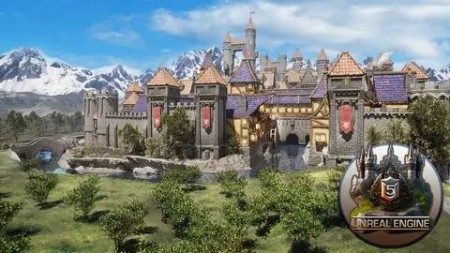
Building Medieval Worlds – Unreal Engine 5 Modular Kitbash
Published 2/2023
MP4 | Video: h264, 1280×720 | Audio: AAC, 44.1 KHz
What you’ll learn
• Learning unique techniques for modular assets for stylized structures
• Creating a functional water system with directional water flow and submergible boat assets
• Building a fully functional open-world landscape material including distance, noise masking, and automatic material transitions
• Assembling custom prop collections using blueprints to make your world alive
• Learning how to create large-scale structures in open-world environments
• Filling your world with animated, nanite-enabled foliage to enrich its nature side
• Sculpting terrain and optimising thermal erosion and hydro erosion to add natural detail to a landscape
• Creating (a) an automatic landscape based on a one-slope angle with mask height overlay, (b) castle tiles with rotation and scaling, and © landscape-painted
• Learning about snapping, free transform techniques, and structure modification
• Learning how to set up and generate for stairs to help your playable character interact better with the world
• Setting up an asset pack that can be easily imported onto any Unreal Engine 5 project
• Creating a dynamic light system using the addon blueprint
• Maintaining and optimising medieval Europe aesthetics for a full medieval stronghold castle keep or city scene using an Unreal Engine 5 skybox
• Complete the course which is going to be the first stepping-stone to creating your 3D world and RPG game environment
Requirements
• To own a computer (Microsoft, Linux or Mac)
• To have downloaded Unreal Engine 5
• A thirst to learn and excitement about 3D modelling, animation, and game engine integration
Description
Overview
Section 1: Introduction
Lecture 1 Introduction
Section 2: Section 1: Introduction to Unreal Engine 5 and Resource Pack
Lecture 2 Lesson 1 – Creating New Project & UI Basics:
Lecture 3 Lesson 2 – Viewport Basics:
Lecture 4 Lesson 3 – [RESOURCE PACK] and Introduction to Modular Kit
Lecture 5 Lesson 4 – Setting up Large-Scale Scene:
Section 3: Section 2: Working on Castle Entrance
Lecture 6 Lesson 5 – Landscape Mode Basics:
Lecture 7 Lesson 6 – Creating Entrance for the Tower:
Lecture 8 Lesson 7 – Creating Curvature out of Stone Walls:
Section 4: Section 3: Creating Elevation out of Castle Structure
Lecture 9 Lesson 8 – Building Archway within Inner Castle Walls:
Lecture 10 Lesson 9 – Building Staircase and Fixing Collisions:
Lecture 11 Lesson 10 – Working with Vertical Slopes of Castle Walls:
Section 5: Section 4: Building a House from the Ground up
Lecture 12 Lesson 11 – Building House Base:
Lecture 13 Lesson 12 – Adding Roof to our 3D Hut:
Lecture 14 Lesson 13 – Breaking up the Surface of a Digital House:
Section 6: Section 5: Structural Decoration of a Virtual House
Lecture 16 Lesson 15 – Adding Smaller Detail to the House
Lecture 17 Lesson 16 – Customizing 3D House Using Props:
Lecture 18 Lesson 17 – Modelling Complexity to our 3D Hut Using Kitbash Assets:
Section 7: Section 6: Working on a 3D Hut from Top Down
Lecture 19 Lesson 18 – Working on a Small 3D Hut from Roof Downwards:
Lecture 20 Lesson 19 – Adding Door and Overhang to 3D Small Hut:
Lecture 21 Lesson 20 – Adding Detail to Small Modular Houses:
Lecture 22 Lesson 21 – Composition Patterns from Modular Houses:
Section 8: Section 7: Free Form 3D Building Creation
Lecture 23 Lesson 22 – Creating Grand Building Using Free Flow Modular Building Technique:
Lecture 24 Lesson 23 – Creating Clock Tower:
Lecture 25 Lesson 24 – Creating Water Mill Using Free-Form Modular Modelling:
Lecture 26 Lesson 25 – Extending 3D Water Mill & Creating Custom Attachments:
Section 9: Section 8: Thinking of Location for Modular Structure Setup
Lecture 27 Lesson 26 – Building Base for River Pass House:
Lecture 28 Lesson 27 – Building Modular Hut for River Top:
Lecture 29 Lesson 28 – Combining the Modular Collections for a Grand 3D Watermill:
Lecture 30 Lesson 29 – Creating Roof Archway Attachments for Custom Buildings:
Lecture 31 Lesson 30 – Adding Water mill to the Center of a Castle:
Section 10: Section 9: Creating UE5 Modular Hut Iterations
Lecture 32 Lesson 31 – Creating Hut Tower Extensions Using 3D Modular Pack:
Lecture 33 Lesson 32 – Reinforcing 3D Huts with Stone:
Lecture 34 Lesson 33 – Finishing Small Hut Iteration and Planning Ahead:
Lecture 35 Lesson 34 – Populating UE5 Castle with Houses:
Section 11: Section 10: Creating Castle Harbor
Lecture 36 Lesson 35 – Creating River Housing Area in UE5:
Lecture 37 Lesson 36 – Breaking up River Roofs with more Roofs:
Section 12: Section 11: Working with Unreal Engine 5 Water Plugin
Lecture 38 Lesson 37 – Creating River in Unreal Engine 5:
Lecture 39 Lesson 38 – Setting up River Material:
Lecture 40 Lesson 39 – Creating Lake Water in UE5:
Section 13: Section 12: UE5 Modeling Mode
Lecture 41 Lesson 40 – Setting up Bridge:
Lecture 42 Lesson 41 – Deforming Bridge Using Modeling Toolkit:
Section 14: Section 13: Decorating Harbor Area
Lecture 43 Lesson 42 – Creating Harbor Area in UE5:
Lecture 44 Lesson 43 – Finalizing Harbor Environment for Castle City:
Lecture 45 Lesson 44 – Creating Boat Occlusion:
Section 15: Section 14: Working with Water Visuals within the Scene
Lecture 46 Lesson 45 – Material Graph Basics:
Lecture 47 Lesson 46 – Tweaking Water Material for Boat Masking:
Lecture 48 Lesson 47 – Material Instance Basics:
Lecture 49 Lesson 48 – Creating Depth Fade Material Instance:
Section 16: Section 15: Building Digital Alleyway
Lecture 50 Lesson 49 – Designing Alley Way 3D Environment:
Lecture 51 Lesson 50 – Creating Mini Huts for Extra Space Fillings of a Castle:
Lecture 52 Lesson 51 – Finding Place for Smaller Houses Within 3D City Scene:
Lecture 53 Lesson 52 – Design Overhangs for a Virtual Street:
Lecture 54 Lesson 53 – Adding Attachments to the Street:
Section 17: Section 16: Working on Street Elevation in UE5
Lecture 55 Lesson 54 – Creating Huts on Top of Castle Walls:
Lecture 56 Lesson 55 – Adjusting Structural Detail for a UE5 Street:
Lecture 57 Lesson 56 – Connecting Edges of our UE5 Castle:
Section 18: Section 17: Landmark Tower in our Unreal Castle
Lecture 58 Lesson 57 – Working on our Environment 3D Landmark:
Section 19: Section 18: Castle Stone Stronghold in UE5
Lecture 59 Lesson 58 – Creating Stronghold Structure in Unreal Engine 5:
Lecture 60 Lesson 59 – Creating Different-Sized Cobblestone Buildings:
Lecture 62 Lesson 61 – Creating Stronghold Structures In-between Landmark and City:
Lecture 63 Lesson 62 – Connecting the Edge to the Stronghold
Section 20: Section 19: Working on Castle back
Lecture 64 Lesson 63 – Finishing Elevation Edges:
Lecture 65 Lesson 64 – Shaping out the Stronghold:
Lecture 66 Lesson 65 – Patching up the Back end of our Virtual Stronghold:
Lecture 67 Lesson 66 – Reinforcing Virtual Castle Walls:
Section 21: Section 20: OpenWorld Landscape Setup in UE5
Lecture 68 Lesson 67 – Preparing for Landscape Creation:
Lecture 69 Lesson 68 – Creating Landscape base Material with Quixel Textures:
Lecture 70 Lesson 69 – Using Noise Texture to Break Landscape Pattern:
Lecture 71 Lesson 70 – Distance Based Material Blending:
Section 22: Section 21: Landscape Material Creation Expansion
Lecture 72 Lesson 71 – Creating Material Blend:
Lecture 73 Lesson 72 – Automatic Landscape Material Setup
Lecture 74 Lesson 73 – Creating Tile Textures for Landscape Material:
Lecture 75 Lesson 74 – Creating Node Reroutes:
Lecture 76 Lesson 75 – UE5 Landscape Material Cleanup:
Section 23: Section 22: Working on a Castle Ground
Lecture 77 Lesson 76 – Fixing Ground for Digital Castle:
Lecture 78 Lesson 77 – Creating Puddles in our Castle:
Section 24: Section 23: Asset Collection Blueprints in UE5
Lecture 79 Lesson 78 – Creating our First Blueprint:
Lecture 80 Lesson 79 – Blueprint Basics:
Lecture 82 Lesson 81 – Populating our Castle With 3D Market Stalls:
Lecture 83 Lesson 82 – Populating Castle with Asset Collections:
Section 25: Section 24: Working on Castle Overall Appearance
Lecture 84 Lesson 83 – Working on Structure Aesthetics inside of Castle Walls:
Section 26: Section 25: Sculpting Castle Terrain
Lecture 85 Lesson 84 – Landscape Building:
Lecture 86 Lesson 85 – Eroding Edges of our Cliffs in UE5:
Lecture 87 Lesson 86 – Working with Chunk Copies:
Section 27: Section 26: Populating Scene with Stone Formations
Lecture 88 Lesson 87 – Bringing in Stone Assets onto our Environment:
Lecture 89 Lesson 88 – Setting up Rock Formation in our Digital Landscape:
Lecture 90 Lesson 89 – Reforming Rock Formation in 3D Environment:
Lecture 91 Lesson 90 – Placing Stone Clusters using Foliage Mode:
Section 28: Section 27: Quixel Material Blend Setup
Lecture 92 Lesson 91 – Quixel Material Blend Setup:
Lecture 93 Lesson 92 – Adjusting Textures using Material Blend Controls:
Lecture 94 Lesson 93 – Vertex Painting:
Section 29: Section 28: Foliage in Unreal Engine 5
Lecture 95 Lesson 94 – Small Foliage Setup:
Lecture 96 Lesson 95 – Building Our Shrubs:
Lecture 97 Lesson 96 – Setting up Large Trees:
Lecture 98 Lesson 97 – Planting Trees in Unreal Engine 5:
Section 30: Section 29: Working on Addition Detail to Give Character to our Castle
Lecture 99 Lesson 98 – Cloth Simulation for Flags:
Lecture 100 Lesson 99 – Adding Fighting Ring to Castle:
Lecture 101 Lesson 100 – Setting up Chimneys and Slabs to Decorate 3D Huts:
Section 31: Section 30: Day and Night Cycle Setup in UE5
Lecture 102 Lesson 101 – Setting up Day-Night Cycle Using BP:
Lecture 103 Lesson 102 – Setting up the Moon in UE5:
Lecture 104 Lesson 103 – Adding Moon Cycles:
Lecture 105 Lesson 104 – Setting up Night Light:
Lecture 106 Lesson 105 – Window Light Sources in UE5:
Lecture 108 Lesson 107 – Setting Torches in Medieval Castle:
Section 33: Section 32: Working on Background Terrain for the Scene
Lecture 109 Lesson 108 – Large Scale Terrain Sculpting:
Lecture 110 Lesson 109 – Sculpting out Large Terrain for Castle Scene:
Lecture 111 Lesson 110 – Creating Clusters of Foliage for Large-Scale Environments:
Lecture 112 Lesson 111 – Setting up Bush Clusters for Large Environments:
Section 34: Section 33: Background Mountain Setup
Lecture 113 Lesson 112 – Adding Decorative Mountains in Background:
Lecture 114 Lesson 113 – Setting up Custom Vertex Blend:
Lecture 115 Lesson 114 – Blending in Mountains with Landscape in UE5:
Section 35: Section 34: Final Touches in Unreal Engine 5
Lecture 116 Lesson 115 – Post Processing in UE5:
Lecture 117 Lesson 116 – Water Wheel Motion:
Lecture 118 Lesson 117 – Final Unreal Engine 5 Steps:
• 3D modellers eager to learn how to use a medieval castle kitbash made up of 241 individual pieces to build an entire castle or city,• Enthusiasts of Unreal Engine 5 who want to fast-track their understanding of its new and exciting changes,• Game designers who would like to design a medieval stronghold castle keep or city including a background mountain range, river, and foliage for games in Unreal Engine 5,• RPG fans and dungeons and dragons (DND) players who want to walk through and experience a medieval stronghold castle keep or city
RapidGator
https://www.keeplinks.org/p27/68d04724a69ad
DDownload
https://www.keeplinks.org/p27/68d052d357cd1