

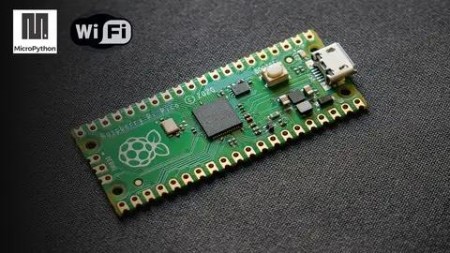
Learn Iot Using Micropython And Raspberry Pi Pico
Published 4/2023
MP4 | Video: h264, 1280×720 | Audio: AAC, 44.1 KHz
What you’ll learn
Students willing to learn embedded systems and Internet of Things
Professionals willing to learn hands on Internet of Things
Teachers, professors taking new subject to teach
Hobbyists exploring Raspberry Pi PICO W for their next IoT projects
Requirements
No Programming experience needed, you’ll learn it all on the go
Basic understanding of electronic components is good to have, but not a requirement for this course
Description
Overview
Section 1: Introduction to Raspberry Pi PICO
Lecture 1 What is Raspberry pi Pico W board
Lecture 2 About Taking this Course
Lecture 3 How to solder headers to Raspberry Pi PICO Board
Lecture 5 How to Run a Program on Boot on Raspberry pi PICO W Board
Lecture 6 Overview of Python Programming
Lecture 7 Using Raspberry Pi PICO W Board for Embedded Systems
Lecture 8 Things Needed for this course
Lecture 9 Resources
Section 2: Input and Output Interfaces with Raspberry Pi PICO W
Lecture 10 6.0 how to use digital output on raspberry pi
Lecture 11 6.1 Transistorized switching circuit with raspberry pi pico w
Lecture 12 7. How to interface relay with raspberry pi pico w
Lecture 13 8. How to interface a push button with raspberry pi pico W
Lecture 14 9. switch interface tasks
Lecture 15 10. how to use optocoupler with Raspberry pi pico w
Lecture 16 11. How to use PWM on raspberry pi pico w
Lecture 17 12. How to interface DC motor with Raspberry pi Pico
Section 3: Sensors Interrfacing with Raspberry Pi PICO W
Lecture 18 13. how to use adc on raspberry pi pico board
Lecture 19 14. how to interface LDR with Raspberry Pi Pico W
Lecture 20 15 how to use LM35 with Raspberry Pi PICO W
Lecture 21 16 how to interface dht22 with raspberry pi pico w
Lecture 22 17 how to interface ds18b20 with raspberry pi pico
Lecture 23 18 How to interface ultrasonic sensor
Section 4: Internet of Things with Raspberry Pi PICO W
Lecture 24 19. Introduction to Internet of Things
Lecture 25 20. What are Hardware device used for creating iot systems
Lecture 26 21. Choosing Cloud Service for IoT
Lecture 28 23. What is Thingspeak
Lecture 29 24. Create an account and send data to Thingspeak1
Lecture 30 25. How to Connect Raspberry PI PICO W to wifi
Lecture 31 26. Send values to thingspeak from PICO W
Lecture 32 27. Thingspeak temperature and humidity sensor
Lecture 33 28. How to troubleshoot thingspeak issues
Lecture 34 29 What is MQTT
Lecture 35 30 Detail of MQTT
Lecture 37 32 How to publish values to MQTT
Lecture 38 33 How to mqqt subscribe
Section 5: Complete Project
Lecture 39 34. Home Automation IoT Complete Project
Beginners in Internet of things,People willing to learn Micropython and Raspberry Pi PICO,IOT and Micropython enthusiasts,Professionals looking to switch to IOT industry

RapidGator
https://www.keeplinks.org/p27/6952eb7aeb848
NitroFlare
https://www.keeplinks.org/p27/6952edcfb09b0
DDownload
https://www.keeplinks.org/p27/6952eefb611c9