

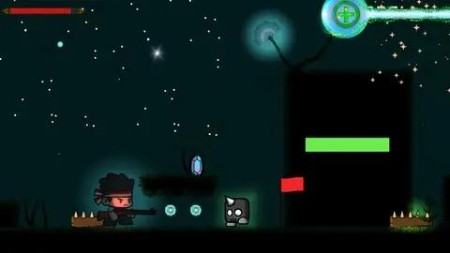
Learn To Create 2D Action Shooter Game Unity & C#
Published 1/2024
MP4 | Video: h264, 1920×1080 | Audio: AAC, 44.1 KHz
Complete Unity 2D Game development for absolute Beginners,Create your first action shooter game 2024
What you’ll learn
Students will gain a solid understanding of Unity’s interface and key features necessary for 2D game development.
Understand how to implement responsive player controls for a platformer game, including character movement, jumping, and other essential actions.
Explore Unity’s 2D physics system, covering concepts like rigidbodies, colliders, and gravity to create realistic interactions between game elements.
Dive into level design principles, including creating platforms, obstacles, and challenges to provide an engaging and dynamic gameplay experience.
Learn to create and implement user interfaces for displaying essential information such as scores, lives, and other relevant game data.
Introduce basic enemy AI behaviors, including patrolling
Shooting,Health and Scoring Systems
Requirements
Mac or PC capable of running Unity 3D
A copy of Unity 2021 or newer
Description
Overview
Section 1: Introduction
Lecture 1 Introduction
Section 2: Player
Lecture 2 Adding the player
Lecture 3 Setting up player
Lecture 4 Basic programming
Lecture 5 Player movement
Lecture 6 Jumping
Lecture 7 Fix jumping
Lecture 8 Changing directions
Lecture 9 Creating animations
Lecture 10 Setting up animator
Lecture 11 Animations final
Section 3: Enviroment
Lecture 12 Setting up enviroment
Lecture 13 Tile palletes
Lecture 14 Background
Section 4: Camera
Lecture 15 Setting up Camera
Section 5: Health System
Lecture 16 Setting up Health
Lecture 17 Health mechanics
Lecture 18 Health UI
Lecture 19 Health System
Lecture 20 Immortality
Lecture 21 Visual Effects
Section 6: Respawning
Lecture 22 Respawning
Lecture 23 CheckPoints
Section 7: Scoring system
Lecture 24 Scoring mechanics
Lecture 25 Scoring UI
Section 8: Enemy
Lecture 26 Adding enemy
Lecture 27 Patrolling
Lecture 28 Damaging player
Lecture 29 Enemy shooting
Lecture 30 Enemy bullet
Section 9: Shooting Mechanics
Lecture 31 Shooting
Lecture 32 Bullet
Lecture 33 Better Shooting
Lecture 34 Destroying enemy
Lecture 35 Fixing bugs
Section 10: Menu
Lecture 36 Creating Main menu
Lecture 37 Making buttons work
Lecture 38 Pause menu
Lecture 39 Fixing bugs
Section 11: Audio
Lecture 40 Adding sounds
Lecture 41 Audio System
Section 12: Levels
Lecture 42 Adding more levels
Lecture 43 Level Transition
Section 13: More Level Mechanics/Platforms
Lecture 44 One way platform
Lecture 45 Falling platform
Section 14: Enviroment Details/Extra
Lecture 46 2D Lights
Lecture 47 Enviroment details
Lecture 49 Player bullet effects
Lecture 50 Enemy bullet effects
Lecture 51 Impact effect
Lecture 52 Final touches
Lecture 53 Building game
