

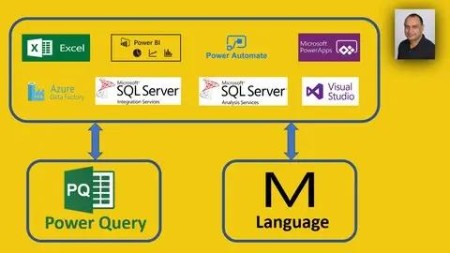
Mastering Power Query And M Language The Easy Way
Published 11/2022
MP4 | Video: h264, 1280×720 | Audio: AAC, 44.1 KHz
Most complete and comprehensive course in Power Query and M Language with hands on exercises and demos step-by-step.
What you’ll learn
Understand Power Query and its components
Understand power query to connect and explore your data
How to Explore reshape and enrich your data
How to create calculated columns
How to Shape or transform data to match your data analysis requirements
How to Refresh a query to import the latest data into a table
How to Combine data from multiple data sources
How to Filter a table based on size, value, or condition
How to Sort a table ranked by a criteria, such as the alphabetical or numerical value of one or multiple columns, and by ascending or descending order.
How to Group rows in a table
How to Expand/Extend a column
How to Aggregate data from a column by group operation, including Sum, Count, Average, Min, and Max
How to Insert a custom column into a table – Insert an Index or Custom column
How to Combine multiple queries by merging or appending them
There is no coding required! Power Query allows you to do that but it’s not necessary
Build complex and custom transformation
Write M code to add/delete/transform custom columns
Implement Best practice in Power Query and M language
Explore how the M language can be used to write your own customized solutions
Use custom functions to extend and enhance Power Query
Create your own formulas and functions to go beyond simple data imports
Gain effiiciency by reducing the time it takes to prepare data for analysis, and make informed decisions more quickly
Gain productivity by properly preparing data yourself, rather than relying on others to do it
Requirements
Microsoft Power BI Desktop (free download)
This course is designed for PC/Windows users (currently not available for Mac)
Your willingness to learn and grow
This is a Power Query and M Language Training for beginners to advanced
Description
Overview
Section 1: Introduction
Lecture 1 What are you going to learn in this course
Lecture 2 Thank you and how to get support
Section 2: Power Query Introduction
Lecture 3 What is Power Query
Lecture 4 Why M$ created Power Query and Why use it
Lecture 5 Power Query Interface Components
Section 3: Introduction to M Language
Lecture 6 First things first
Lecture 7 What is M Language.
Lecture 8 M Language Syntax
Lecture 9 M Language Type Structures Values
Lecture 10 M Language Type Primitive Values
Lecture 11 M Language Operators
Lecture 12 What are Lists and how to create them using M Language
Lecture 13 What are Tables and Records
Section 4: Home Tab in Power Query
Lecture 14 Create initial pbix file
Lecture 15 Close and Apply
Lecture 16 New and Recent Sources-0
Lecture 17 New and Recent Sources-1
Lecture 18 Data Source and Privacy Settings
Lecture 19 Using Parameters in Report-0
Lecture 20 Using Parameters in Report-1
Lecture 21 Using Parameters as File Path or Data Source
Lecture 22 Query Options
Lecture 23 Manage Column using M Language
Lecture 24 Reduce Rows using Power Query
Lecture 25 Reduce Rows using M Language
Lecture 26 Sort Order for Data and Filters using Power Query
Lecture 27 Sort Order for Data using M Language
Lecture 28 Split Column using Power Query
Lecture 29 Split Column using M Language
Lecture 30 Group by or Grouping Data using Power Query-0
Lecture 31 Group by or Grouping Data using Power Query-1
Lecture 32 Group by using M Language
Lecture 33 Data Type using Power Query and M
Lecture 34 Headers as first row and First row as Headers using Power Query and M
Lecture 35 Replace Values using Power Query and M
Lecture 36 Merge Tables using Power Query-0
Lecture 37 Merge Tables using Power Query-1
Lecture 38 Append Tables using Power Query-0
Lecture 39 Append Tables using Power Query-1
Section 5: Transform Tab in Power Query
Lecture 40 Group by or Grouping Data using Power Query-0
Lecture 41 Group by or Grouping Data using Power Query-1
Lecture 42 Headers as first row and First row as Headers using Power Query and M
Lecture 43 Transpose-Reverse-Count Rows using Power Query and M
Lecture 44 Data Type and Rename using Power Query and M
Lecture 45 Replace – Fill using Power Query and M
Lecture 46 Pivot – Unpivoting using Power Query
Lecture 47 Move – Convert to List using Power Query
Lecture 48 Split Column using Power Query 0
Lecture 49 Split Column using Power Query 1
Lecture 50 Split Column using M Language
Lecture 51 Format – Trim – clean -Lower – Upper Case using Power Query
Lecture 52 Format – Trim – clean -Lower – Upper Case using M Language
Lecture 53 Merge Columns using Power Query and M Language
Lecture 54 Extract using Power Query and M Language
Lecture 55 Parse XML Data using Power Query and M Language
Lecture 56 Parse JSON Data using Power Query and M Language
Lecture 57 Statistics using Power Query and M Language
Lecture 58 Standard and Scientific using Power Query and M Language
Lecture 59 Trigonometry – Rounding – Information using Power Query and M Language-0
Lecture 60 Trigonometry – Rounding – Information using Power Query and M Language-1
Lecture 61 Date Transformation using Power Query and M Language-0
Lecture 62 Date Transformation using Power Query and M Language-1
Lecture 63 Time-Duration Transformation using Power Query and M Language
Section 6: AddColumn Tab in Power Query
Lecture 64 Column From Example using Power Query and M Language
Lecture 65 Custom Column using Power Query and M Language-0
Lecture 66 Custom Column using Power Query and M Language-1
Lecture 67 Invoke Custom Column using Power Query and M Language-0
Lecture 68 Invoke Custom Column using Power Query and M Language-1
Lecture 69 Conditional Column using Power Query and M Language
Lecture 70 Index Column using Power Query and M Language-0
Lecture 71 Index Column using Power Query and M Language-1
Lecture 72 Duplicate and Merge Column using Power Query and M Language
Lecture 73 Format – Trim – clean -Lower – Upper Case using Power Query
Lecture 74 Format – Trim – clean -Lower – Upper Case using M Language
Lecture 75 Extract using Power Query and M Language
Lecture 76 Parse XML Data using Power Query and M Language
Lecture 77 Parse JSON Data using Power Query and M Language
Lecture 78 Statistics using Power Query and M Language
Lecture 79 Standard and Scientific using Power Query and M Language
Lecture 80 Trigonometry – Rounding – Information using Power Query and M Language
Lecture 81 Date Transformation using Power Query and M Language-0
Lecture 82 Date Transformation using Power Query and M Language-1
Lecture 83 Time- Duration Transformation using Power Query and M Language
Section 7: View Tab in Power Query
Lecture 84 Query Setting in View Tab-0
Lecture 85 Query Setting in View Tab-1
Lecture 86 Data Preview 1 in View Tab
Lecture 87 Data Preview 2 in View Tab
Section 8: Create Date Table using M language and Dax
Lecture 88 Create Calendar using M Language and DAX
Section 9: Power Query Best Practices
Lecture 89 Power Query Best Practices-0
Lecture 90 Power Query Best Practices-1
Lecture 91 Power Query Best Practices-2
Section 10: Mega searchable tutorials o Power BI, DAX, SQL and Power Query
Lecture 92 Mega searchable tutorials o Power BI, DAX, SQL and Power Query
Section 11: Additional contents – Best Practices Power BI
Lecture 93 Best Practices Power BI-0
Lecture 94 Best Practices Power BI-1
Lecture 95 Best Practices Power BI-2
Lecture 96 Best Practices Power BI-3
Lecture 97 Best Practices Power BI-4
Lecture 98 Best Practices Power BI-5
Section 12: Additional content – Dashboard in a day
Lecture 99 DIAD – Introduction
Lecture 100 DIAD – Accessing Data
Lecture 101 DIAD – Data Prepration-0
Lecture 102 DIAD – Data Prepration-1
Lecture 103 DIAD -Data Modeling and Exploration-0
Lecture 104 DIAD -Data Modeling and Exploration-1
Lecture 105 DIAD -Data Modeling and Exploration-2
Lecture 106 DIAD -Data Modeling and Exploration-3
Lecture 107 DIAD -Data Modeling and Exploration-4
Lecture 108 DIAD – Data Visualization-0
Lecture 109 DIAD – Data Visualization-1
Lecture 111 DIAD – Creating Dashboards
Lecture 112 DIAD – Creating Dashboards-0
Lecture 113 DIAD – Creating Dashboards-1
This course is for beginners. we focus on taking you from beginners to advance by working on business use cases,If want to learn Power Query and M Language completely from scratch,Non technical employee who is interested in solving business challenges without writing codes,Anyone interested in business transformation using no/low code platform,Anyone that needs to import and clean data to be analyzed,Anyone who copies and pastes data into the same Excel spreadsheet on a regular basis in order to be able to continue their workflow,Individuals interested in upskilling to become more competitive and productive at work,If you know some Power Query and M Language skills but want to get better,If you are good with Power Query and M Language and want to take your skills to the next level and truly leverage the full potential of Power Query and M Language,Employees with repetitive task or seemingly manual processes and need to automate them,Students who want to upskill in preparation for job placement,Managers who is interested in what is possible with Power Platform,Young Graduate who need to add more skills to their skillset for better job placement
DDownload
https://www.keeplinks.org/p27/688a501a84133
RapidGator
https://www.keeplinks.org/p27/688a51a832569
NitroFlare
https://www.keeplinks.org/p27/688a54b16b5e2