

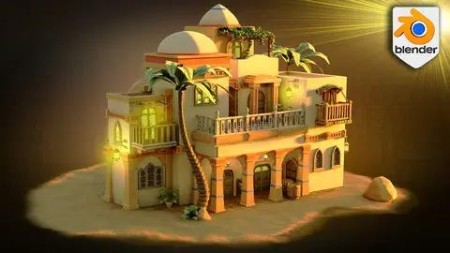
The Blender 4 Ultimate Guide
Published 12/2023
MP4 | Video: h264, 1920×1080 | Audio: AAC, 44.1 KHz
Blender 4 Complete course on realistic 3D environments & Buildings including geometry nodes and cloth simulation
What you’ll learn
• Blender Basics: Navigating the Viewport – Master the essential techniques to efficiently move around Blender’s viewport.
• Reference-Based Modelling – Learn to use PureRef, Google, AI, and Pinterest for gathering references and creating stunning models.
• Creating Greyboxes – Adopt AAA industry standards in greyboxing for assets and environments.
• Working with Eevee Next & Blender Cycles – Gain proficiency in both the new Eevee Next and Blender Cycles rendering engines.
• Blender Asset Manager Mastery – Explore the functionalities of Blender’s Asset Manager for efficient project management.
• Modelling Workflow – From basic modelling techniques to advanced professional workflows, including secrets used by pros.
• Geometry Nodes for Procedural Modelling – Leverage geometry nodes to enhance workflow efficiency with procedural modelling.
• Vertex Painting for Landscapes – Texture landscapes using vertex painting, bringing scenes to life with unprecedented realism.
• Complete Guide to Blender Shaders – Understand the assembly and application of Blender shaders.
• Advanced UV Mapping – Learn advanced UV mapping techniques to effectively hide seams.
• Rendering and Compositing – In-depth guide to rendering and compositing, making any scene look expertly crafted.
• Composition and Planning Insights – Gain inside knowledge on planning and creating compelling compositions.
• Comprehensive Lighting Guide – Including detailed use of Blender’s powerful sky texture.
• Blender Cloth Generator Guide – Complete walkthrough of using Blender’s cloth generator.
• Introduction to Blender Sculpting – A primer on sculpting in Blender, focusing on cloth and terrain enhancements.
• Displacement Modifier Guide – Detailed tutorial on using the displacement modifier for realistic textures.
• Emission Techniques – Learn how to use emission to add vibrancy and depth to scenes.
Requirements
• To own a computer (Microsoft, Linux or Mac)
• To have downloaded Blender
• To download all course resources including 4 x geometry nodes (chain geometry node, palm tree geometry node, grapevine geometry node, planks geometry node), 1 x displacement modifier terrain setup, multiple reference plants and foliage (4 x ferns, 4 x plants, 8 x grape bundles), and 1 x human reference. You will also find 31 different types of textures and shaders and 120 x texture maps. The resource pack also has 1 x terrain, 1 x rock, 1 x stone, 1 x wall, 4 x wood, 2 x metal, 1 x gold, 1 x cloth, 3 x windows, 4 x painted wood pieces, 1 x rope, 1 x palm, 1 x set of tiles, 1 x water, 1 x carpets, 1 x linen, 1 x basket weave, 3 x clay and soil, 2 x coloured stone.
Description
Overview
Section 1: Introduction
Lecture 1 Introduction
Section 2: Introduction to Blender and Asset Management
Lecture 2 Lesson 1 – Blender Basics Overview [Resource Pack]
Lecture 3 Lesson 2 – Setting Up New Projects in Blender
Lecture 4 Lesson 3 – Mastering Blender Asset Manager Setup
Lecture 5 Lesson 4 – Efficiently Storing Files in Blender’s Asset Manager
Section 3: Resource and Reference Management in Blender
Lecture 6 Lesson 5 – Resource Pack Configuration for Blender Courses
Lecture 7 Lesson 6 – Efficient Reference Setup for 3D Environment Design
Lecture 8 Lesson 7 – Generating Creative References with ChatGPT AI
Lecture 9 Lesson 8 – Techniques for Blocking Out 3D Scenes Using Primitives
Lecture 10 Lesson 9 – Mastering Greyboxing for 3D Environmental Design
Section 4: Advanced Greybox Modeling and Lighting
Lecture 11 Lesson 10 – Elevation Techniques for Greybox 3D Scenes
Lecture 12 Lesson 11 – Designing 3D Greybox Staircases
Lecture 13 Lesson 12 – Implementing Lighting Skyboxes for Greybox Environments
Section 5: Structural Elements and Greyboxing
Lecture 14 Lesson 13 – Planning Windows and Balconies in 3D Models
Lecture 15 Lesson 14 – Roof Shape Planning in Blender
Lecture 16 Lesson 15 – Structural Support Considerations in Blender Scenes
Lecture 17 Lesson 16 – Arcway Design Techniques for Greyboxing
Section 6: Creating Natural Elements with Geometry Nodes
Lecture 18 Lesson 17 – Crafting Palm Trees Using Geometry Nodes
Lecture 19 Lesson 18 – Adjusting Stylized 3D Palm Trees for Scene Integration
Section 7: Pillar Design and Texture Application
Lecture 20 Lesson 19 – Crafting Stylized Pillars in Blender
Lecture 21 Lesson 20 – Introduction to Seams and Sharps in Blender
Lecture 22 Lesson 21 – Techniques for UV Unwrapping Pillars
Lecture 23 Lesson 22 – Basics of Texture Import and Material Setup
Lecture 24 Lesson 23 – Applying Textures to Pillars for Enhanced Realism
Section 8: Architectural Features and Asset Management
Lecture 25 Lesson 24 – Designing Archways in Blender
Lecture 26 Lesson 25 – Creating Decorative Beam Elements
Lecture 28 Lesson 27 – Organizing Pillars and Archways Using the Asset Library
Lecture 29 Lesson 28 – Integrating Pillars and Archway Supports into Scenes
Section 9: Door Design and Asset Creation
Lecture 30 Lesson 29 – Modeling Your First Door Asset in 3D
Lecture 31 Lesson 30 – Stylizing Doors to Match Environmental Aesthetics
Lecture 32 Lesson 31 – Creating Realistic Metal Hinges
Lecture 33 Lesson 32 – Adjusting Doors and Converting them into 3D Assets
Section 10: Section 9 – Window Design and Texture Utilization
Lecture 34 Lesson 33 – Crafting a Stylized Window in Blender
Lecture 35 Lesson 34 – Using Atlased Textures to Illuminate Windows
Section 11: Rooftop and Staircase Design in 3D
Lecture 36 Lesson 35 – Modeling an Aesthetic Rooftop
Lecture 37 Lesson 36 – Constructing Staircases with Precision Measurement Systems
Lecture 38 Lesson 37 – Adding Style to Staircases
Lecture 39 Lesson 38 – Utilizing the Array Modifier for Staircase Modeling
Lecture 40 Lesson 39 – Designing Stylized Tiles for Staircases
Section 12: Doorway Design and Wood Texturing
Lecture 41 Lesson 40 – Understanding Normals and Doorway Modeling
Lecture 42 Lesson 41 – Techniques for Unwrapping Door Frames to Enhance Wood Grain
Lecture 43 Lesson 42 – Finalizing Doorway Entrances
Lecture 44 Lesson 43 – Decorating Doorway Entrances with Beams
Section 13: Entrance Beautification with Foliage and Pottery
Lecture 45 Lesson 44 – Adding Foliage Ferns to Enhance Entrance Appeal
Lecture 46 Lesson 45 – 3D Modeling of Plant Pots
Lecture 47 Lesson 46 – Techniques for Modeling and Unwrapping Spherical Roofs
Section 14: Section 13 – Advanced Door Design and Texture Application
Lecture 48 Lesson 47 – Modeling Another Stylized Door in Blender
Lecture 49 Lesson 48 – Techniques for Applying Textures to Doors
Section 15: Enhancing Windows with Mirror Modifiers and Cloth Physics
Lecture 50 Lesson 49 – Modeling Double-Framed Windows Using Mirror Modifiers and Loop Tools
Lecture 51 Lesson 50 – Creating Curtains with Cloth Physics Simulation
Lecture 52 Lesson 51 – Techniques for Window Mesh Cleanup and Stylization
Lecture 53 Lesson 52 – Using Geometry Nodes for Balcony Base Planks
Lecture 54 Lesson 53 – Modeling Support Structures for Balconies
Section 16: Balcony Design and UV Mapping
Lecture 55 Lesson 54 – Attaching Balconies to Walls with Chain Geometry Nodes
Lecture 56 Lesson 55 – Modeling Attachments for Balcony Rooftops
Lecture 57 Lesson 56 – UV Unwrapping and Straightening Wood Supports
Section 17: Enhancing Back Entrances and Staircases
Lecture 58 Lesson 57 – Working on the Backside Entrance Design
Lecture 59 Lesson 58 – Creating Curved Staircases for Back Entrances Using Simple Deform
Section 18: Advanced Window Modeling and Texturing
Lecture 60 Lesson 59 – Modeling a 3-Framed Window Asset by Merging Primitive Shapes
Lecture 61 Lesson 60 – Fixing Mesh Gaps in Window Frames
Lecture 62 Lesson 61 – Texturing Three-Piece Windows
Lecture 64 Lesson 63 – Strategically Placing Doors and Windows in the Scene
Section 20: Cloth Shades and Sculpting Details
Lecture 65 Lesson 64 – Working with Cloth Simulations for Shades
Lecture 66 Lesson 65 – Sculpting Additional Details Using Sculpt Mode
Lecture 67 Lesson 66 – Texturing Cloth Shades for Realism
Section 21: Texturing and Supporting Main Building Structures
Lecture 68 Lesson 67 – Adding Texture to Main Building Structures
Lecture 69 Lesson 68 – Wrapping Stone Supports Around Main Building Structures
Section 22: Camera Framing and Render Setup
Lecture 70 Lesson 69 – Setting Up Main Composition for Camera Framing and Rendering
Lecture 71 Lesson 70 – Resolving Texturing Issues in Rendered Material Shaders
Section 23: Stylized Architectural Elements and Material Application
Lecture 72 Lesson 71 – Modeling a Stylized Archway
Lecture 73 Lesson 72 – Creating Fancy Stylized Balcony Railings
Lecture 74 Lesson 73 – Adding Materials to Marble Railings
Lecture 75 Lesson 74 – Creating Stylized Décor for Railings
Section 24: Balcony Flooring and Tile Design
Lecture 76 Lesson 75 – Working on Balcony Flooring Designs
Lecture 77 Lesson 76 – Creating Stylized Tiles Using a Material Atlas
Lecture 78 Lesson 77 – Applying Fancy Tiles to Marble Balconies and Reusing in Other Spaces
Section 25: Roof Design and Balcony Attachments
Lecture 79 Lesson 78 – Creating a Stylized Rounded Roof
Lecture 80 Lesson 79 – Adding Roof Attachments to Stylized Balconies
Section 26: Decorative Elements and Prop Modeling
Lecture 81 Lesson 80 – Modeling Plant Vases for Enhanced Aesthetics
Lecture 82 Lesson 81 – Creating a Stylized Barrel
Lecture 83 Lesson 82 – Finalizing and Texturing the Stylized Barrel
Lecture 84 Lesson 83 – Crafting a Woven Basket for Scene Detailing
Section 27: Modeling and Unwrapping Unique Props
Lecture 85 Lesson 84 – Modeling Fabric Bags for Scene Enhancement
Lecture 86 Lesson 85 – Unwrapping Decimated Mesh with the Bisect Tool
Lecture 87 Lesson 86 – Recentering Structural Decorations for Symmetry
Lecture 88 Lesson 87 – Adding Structural Supports to Balconies
Section 28: Balcony Design and Decorative Detailing
Lecture 89 Lesson 88 – Creating Radial Balcony Railings for Unique Designs
Lecture 90 Lesson 89 – Adding Support Elements to Railings for Stability
Lecture 91 Lesson 90 – Creating Balcony Shade Decorations for Visual Appeal
Section 29: Section 28 – Foliage Integration and Geometry Nodes Application
Lecture 92 Lesson 91 – Crafting a Wood Frame for Grape Foliage Sections
Lecture 93 Lesson 92 – Adding Grape Berries for Realistic Detail
Lecture 94 Lesson 93 – Utilizing Ivy Geometry Nodes for Dynamic Foliage
Section 30: Palm Tree Replacement and Texture Adjustment
Lecture 95 Lesson 94 – Replacing Palm Tree Mesh for Improved Quality
Lecture 96 Lesson 95 – Altering Palm Tree Leaf Textures for a More Stylized Look
Section 31: Section 30 – Prop Modeling and Texture Application
Lecture 97 Lesson 96 – Modeling Crate Props Using the Solidify Modifier
Lecture 98 Lesson 97 – Sculpting Rocks with the ‘Extra Object’ Add-On
Lecture 99 Lesson 98 – Techniques for UV Unwrapping Rocks
Lecture 100 Lesson 99 – Modeling Carpet Assets with Curve Spirals
Lecture 101 Lesson 100 – Applying Textures to Carpet for Realism
Section 32: Well Design and Complementary Prop Creation
Lecture 102 Lesson 101 – Modeling a Bucket for the Well
Lecture 103 Lesson 102 – Crafting a Stylized Well
Lecture 104 Lesson 103 – Creating a Rope Using Curve Nurbs
Lecture 105 Lesson 104 – Texturing the Stylized Well for Realism
Section 33: Section 32 – Render Compositor Setup and Adjustment
Lecture 106 Lesson 105 – Setting Up Render Compositor Layers for Enhanced Visuals
Lecture 107 Lesson 106 – Adjusting Compositor Layers for Optimal Results
Section 34: Section 33 – Light Source Modeling and Scene Optimization
Lecture 108 Lesson 107 – Modeling Additional Light Sources for Scene Illumination
Lecture 109 Lesson 108 – Adjusting the Lantern Asset and Adding Textures
Lecture 110 Lesson 109 – Tweaking Light Strength for Scene Balance
Lecture 111 Lesson 110 – Cleaning Up the Scene to Enhance Performance
Lecture 112 Lesson 111 – Attaching Additional Lanterns for Ambient Lighting
Section 35: Section 34 – Terrain Detailing and Texturing Techniques
Lecture 113 Lesson 112 – Adding Detail to Terrain for Realism
Lecture 114 Lesson 113 – Applying Terrain Texture Using Vertex Painting
Lecture 115 Lesson 114 – Creating Opacity Masks for Refined Edges
Lecture 116 Lesson 115 – Cleaning Up Tiles on Terrain for Consistency
Section 36: Section 35 – Finalizing Composition and Rendering
Lecture 117 Lesson 116 – Finalizing the Composition and Preparing for Rendering
Lecture 118 Lesson 117 – Final Thoughts and Reviewing Our Completed Work
RapidGator
https://www.keeplinks.org/p27/693731080aa8d
DDownload
https://www.keeplinks.org/p27/69373dffdb8e0