

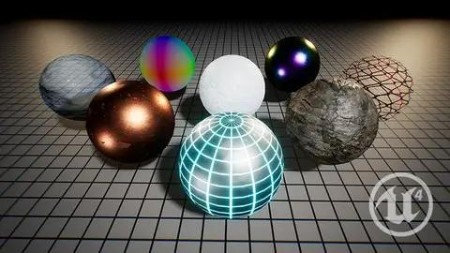
Unlocking the Unreal Engine Material Editor
.MP4 | Video: 1280×720, 30 fps(r) | Audio: AAC, 48000 Hz, 2ch | 2.83 GB
Learn how to combine textures, color data, and math to create your own custom AAA quality shaders
What you’ll learn
Create practical materials based on real world uses for shaders within a game environment
Understand how to use color data in complex ways to create breathtaking effects for your materials
Requirements
You should be able to use a computer, including file explorer navigation and common shortcuts like copy/paste
You should have a computer capable of running Unreal Engine
To follow along, it is recommended that you have Unreal Engine 4.20.3 or later
You should be familiar with the basics of Unreal Engine (How to navigate between tabs, how to navigate the 3d-viewport, how to assign materials to objects, etc.)
Description
Find out the tricks and techniques to create complex, high quality shader effects for your games!
This course will teach you how to create advanced materials and shaders using PRACTICAL REAL WORLD examples!
The power of materials in a game environment is often severely underestimated. Many complex effects like animated grass, parallax shading, light absorption, and more are achieved with only an object’s material and not with any complicated scripts. Good materials and shaders are becoming an ever more important facet of a game’s overall look and node based shader networks are the industry standard for creating them. The Unreal Engine material editor is one of the best on the market.
This course will teach you how to use this powerful tool
Learn by DOING
This course is divided into several projects. Each is intended to teach you a new powerful technique for creating materials. For each material, we’ll go step-by-step through each node, what it does, and why it’s used. By the end, YOU will make a collection of high quality materials that you can build off of for your own games!
Downloadable project files to help you follow along
This course will cover:
The fundamentals of the Unreal Engine material editor
The differences between textures and materials
How to use information about an object like its position, rotation, and proximity to other objects to affect the material
How to combine colors and values using simple math operations to have total control over the material’s look
How to create your own custom material functions
Who is the target audience?
Anyone who wants to learn about material creation in Unreal Engine 4, no matter their experience level
People who want to learn tips and techniques for creating more advanced materials that can achieve a myriad of visual effects
People who want to learn how to use node based shader networks both in Unreal and in other software like Unity, Blender, and Maya
RapidGator
https://www.keeplinks.org/p27/68d6dcf70c968
NitroFlare
https://www.keeplinks.org/p27/68d6de178c205
DDownload
https://www.keeplinks.org/p27/68d6df6bb5dbb