

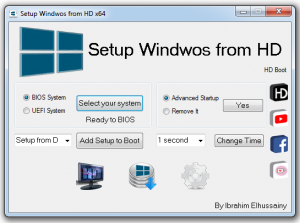
Setup Windows from HD | 10 MB
It can help you to setup windows Vista, 7, 8, 10 from hard disk wihout useing
flash disk or DVD.
its very easy to use
* Explain
1. Extract a windows files from iso file to main root of partition D, E, F, or G
2. Run Setup Windows From HD (xx).exe
3. Select between BIOS or UEFI and press “select your system” button
4. Select from D or any other partition which extracted windows iso files in it
and press “Add Setup Boot” button..
its all.
* Note that after add installation entry in boot menu, first reboot it will load a setup
new screen.
DOWNLOAD:
32BIT
https://filecrypt.cc/Container/B680545AD3.html
64BIT